
Ultimate Guide: Fast Resin Printing Settings for Mini Plates on Any LCD Printer

Updated: Dec 10, 2025
Resin 3D printing produces incredible detail, but print speed is often a bottleneck. Waiting hours for a model can be frustrating, especially for small but precise items like dental models, miniatures, or jewelry masters. Fortunately, mini plates and mini vats provide a way to speed up printing without sacrificing quality.
In this guide, we’ll dive into the best printing settings, focusing on lift speed adjustments for ordinary, fast, and ultra-fast printing with mini plates.
Why Mini Plates Make Printing Faster
Mini plates improve print speed primarily because:
Shorter Z-Lift Distance: Each layer moves less, reducing total print time.
Lower Suction Force: Smaller plates have less contact with the resin, making layer peeling faster and smoother. This means you can increase the lift and retract speed.
By optimizing your settings around these advantages, you can safely accelerate prints by 30–70% compared to standard plates.
1. Layer Height
Layer Height and Print Speed
Layer height directly affects both print speed and model accuracy. Using a higher layer height (e.g., 0.1 mm) can significantly increase speed mainly because:
Fewer Layers: The total number of layers needed to complete the print is reduced, which decreases the total number of lift and exposure cycles.
Trade-off: Higher layer heights may slightly reduce detail and smoothness, particularly on curved or intricate surfaces. For precision models like dental crowns or jewelry masters, a lower layer height (0.05mm) is usually recommended to maintain detail.
2. Bottom Layers
The first few layers need secure adhesion:
Bottom Layers: 3–5 layers
Bottom Exposure: 40–60 seconds (varies by resin)
Tip: Mini plates allow slightly shorter bottom layers because the smaller surface area reduces peel stress.
3. Normal Layer Exposure
While mini plates and mini vats reduce lift distances and resin volume, the normal layer exposure time generally remains similar to standard printing. This is because exposure time is primarily determined by resin curing properties, not the size of the build plate or vat.
Key Point: Faster printing with mini plates comes mainly from reduced lift distance and faster lift speeds, not significantly shorter exposure times.
Practical Tip: Always follow the resin manufacturer’s recommended exposure times for optimal layer adhesion and print quality. Slight adjustments can be made only after test prints confirm consistent curing.
4. Lift Speed Optimization
Lift speed is one of the biggest factors in print time. Mini plates allow you to increase lift speed safely because the smaller surface reduces suction force. Here’s a breakdown (example of Phrozen Sonic Mini 8K):
Print Mode | Lift Distance (per layer) | Lift Speed | Bottom Lift Speed | Retract Speed | Notes |
Ordinary Printing | 5-6 mm | 80-100 mm/min | 50–60 mm/min | 180-120 mm/min | Standard settings for stability and adhesion |
Fast Printing | 3-4 mm | 120–180 mm/min | 80–100 mm/min | 250-180 mm/min | Speeds up printing without compromising most models |
Ultra-Fast Printing | 2-3 mm | 250–300 mm/min | 100–120 mm/min | 350-220 mm/min | Only for small models on mini plates; test first to avoid layer separation |
Tips for Lift Speed Adjustment:
Start with moderate increases and test the first few layers.
Ensure your resin flows back into the mini vat quickly between lifts.
Ultra-fast printing works best with small models and low-viscosity resins.
5. Mini Vat Considerations
Maintain resin temperature: Slightly warmer resin flows better, especially for faster lifts.
Tip: Cleaning mini vats is faster, and less resin waste occurs if a print fails.
6. Placement & Orientation
Tilt small models to reduce support contact and peel forces.
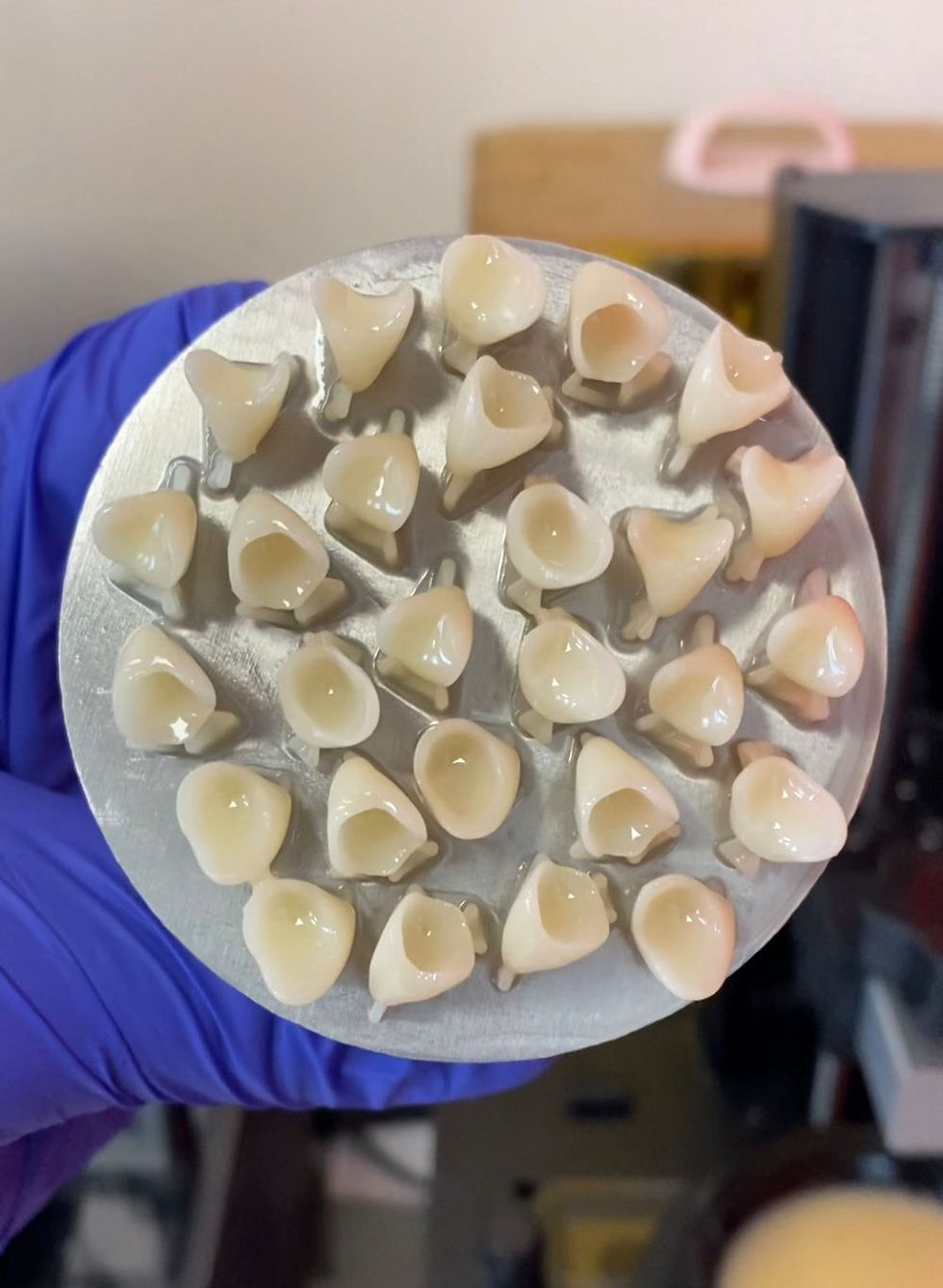
Batch multiple items on a mini plate to maximize throughput.
Avoid large, flat objects on mini plates—they are better suited for standard plates.
7. Maintenance & Safety
Check mini plate leveling before the first print.
Clean mini vats regularly to maintain smooth peeling.
Monitor first layers closely—faster settings increase risk if adhesion is weak.

Final Thoughts
Mini plates combined with optimized lift speeds can dramatically reduce print times while maintaining high-quality results. Ordinary printing is safe and stable, fast printing increases throughput, and ultra-fast printing unlocks maximum efficiency for small models.
At Mini4Speed, our precision mini plates and mini vats are designed for speed, stability, and consistent results—perfect for anyone looking to revolutionize their resin printing workflow.


Comments